
Last Updated: July 2026
Wondering How to Know the Size of My Laptop -Have you ever shopped online for a laptop sleeve, backpack, screen protector, or replacement display and realized you don’t actually know your laptop’s size?
You’re not alone.
Many people assume that the physical dimensions of a laptop and its screen size are the same. In reality, manufacturers advertise laptops by screen size, measured diagonally from one corner of the display to the opposite corner—not by the laptop’s width or height.
The good news is that finding your laptop’s size takes only a few minutes. Whether you use Windows, macOS, or ChromeOS, there are several reliable methods that don’t require any technical expertise.
In this guide, you’ll learn exactly how to determine your laptop’s size, understand what those measurements mean, and avoid buying accessories that don’t fit.
Quick Answer
If you’re wondering “How do I know my laptop size?”, here are the fastest methods:
| Method | Accuracy | Time Required |
|---|---|---|
| Measure the screen diagonally | ⭐⭐⭐⭐⭐ | 2 minutes |
| Check laptop model number | ⭐⭐⭐⭐⭐ | 1 minute |
| View manufacturer specifications | ⭐⭐⭐⭐⭐ | 2 minutes |
| Use Windows System Information | ⭐⭐⭐⭐ | 2 minutes |
| Check your purchase invoice | ⭐⭐⭐⭐⭐ | 1 minute |
| Look at the original packaging | ⭐⭐⭐⭐⭐ | 1 minute |
| Visit the manufacturer’s support page | ⭐⭐⭐⭐⭐ | 3 minutes |
| Use third-party hardware tools | ⭐⭐⭐⭐ | 3 minutes |
If you need an exact measurement for buying accessories, measuring the screen manually is usually the most reliable option.
Laptop Size vs Laptop Dimensions: What’s the Difference?
This is one of the most common points of confusion.
When manufacturers advertise a 15.6-inch laptop, they are referring to the display size, not the laptop’s overall dimensions.
For example:
- A 15.6-inch laptop may be around 14 inches wide.
- Another 15.6-inch model from a different brand may be thinner and more compact.
- Two laptops with the same screen size can have completely different body sizes because of different bezel designs.
Modern laptops often feature ultra-thin bezels, allowing manufacturers to fit larger screens into smaller bodies.
Understanding this difference is important when purchasing:
- Laptop sleeves
- Protective cases
- Screen protectors
- Keyboard covers
- Laptop stands
- Carrying backpacks
Does How to Know the Size of My Laptop Matters
Many users don’t think about laptop size until they need an accessory or replacement part.
Knowing the correct size helps you:
- Buy the correct laptop sleeve.
- Choose a compatible backpack.
- Order the right screen protector.
- Replace a damaged display.
- Select a laptop stand that fits properly.
- Purchase compatible privacy filters.
- Compare models before upgrading.
Even a half-inch difference can prevent an accessory from fitting correctly.
Method 1: Measure the Screen Diagonally
This is the simplest and most accurate method.
Step 1
Turn off your laptop.
Step 2
Open the lid completely.
Step 3
Take a measuring tape or ruler.
Step 4
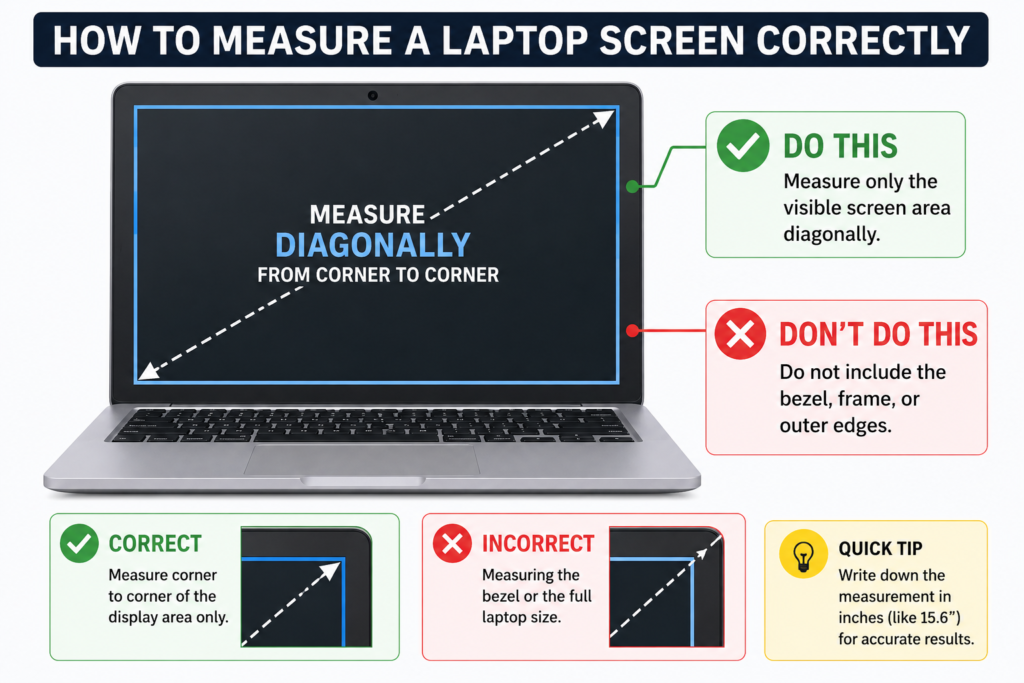
Measure only the visible screen area.
Do not include the bezel or frame around the display.
Step 5
Measure diagonally from:
- bottom-left corner
to - top-right corner
or
- top-left corner
to - bottom-right corner
This measurement is your laptop’s advertised screen size.
Example
| Measured Screen | Laptop Size |
|---|---|
| 11.6 inches | 11.6-inch laptop |
| 13.3 inches | 13.3-inch laptop |
| 14 inches | 14-inch laptop |
| 15.6 inches | 15.6-inch laptop |
| 16 inches | 16-inch laptop |
| 17.3 inches | 17.3-inch laptop |
This method works for virtually every laptop brand.
Method 2: Check the Laptop Model Number
Every laptop has a unique model number.
You can usually find it:
- underneath the laptop
- inside the battery compartment (older models)
- on the original box
- on the purchase invoice
Example model numbers:
- Dell Inspiron 3530
- HP Pavilion 15-eg3000
- Lenovo IdeaPad Slim 5
- ASUS Vivobook 15
- Acer Aspire 5
Once you know the model number, visit the manufacturer’s official website and search for it. The specifications page will list the exact display size along with other hardware details.
Method 3: Find the Size on Windows
Windows doesn’t directly display screen size, but it provides useful system information.
Open Settings
Go to:
Settings → System → Display
You’ll find:
- Display resolution
- Scaling
- Orientation
- Multiple monitor settings
Although Windows won’t show the screen size itself, combining this information with your model number makes identification straightforward.
You can also press:
Windows + R
Type:
msinfo32This opens System Information, where you can find your device model.
Method 4: Check Using Command Prompt
Another easy approach is using Command Prompt.
Open Command Prompt and enter:
wmic csproduct get nameWindows displays your laptop model.
Once you have the model number, search it on the manufacturer’s support page to find the official display size.
This method is especially useful if the sticker on the bottom of your laptop has worn off.
Method 5: Use the Manufacturer’s Support Website
Most laptop manufacturers maintain searchable support databases.
Search using:
- Product name
- Serial number
- Model number
The product page usually includes:
- Screen size
- Resolution
- Panel type
- Weight
- Dimensions
- Processor
- RAM
- Storage
This ensures you receive accurate specifications directly from the manufacturer.
Method 6: Check macOS
MacBook users can quickly identify their laptop model.
Select the Apple menu.
Choose:
About This Mac
You’ll see information including:
- MacBook Air or MacBook Pro
- Processor
- Chip
- Year
- Storage
- Memory
If the screen size isn’t immediately shown, copy the model information and search Apple’s official specifications page.
Method 7: Chromebook Users
Chromebook owners can also identify laptop size easily.
Open:
Settings → About ChromeOS
Locate the device model.
Search the model on the manufacturer’s website to find the official screen size.
Most Chromebook manufacturers provide detailed product pages including display dimensions.
Method 8: Use Online Hardware Detection Tools
Several trusted hardware information utilities can identify your laptop model and hardware components.
These tools often display:
- Manufacturer
- Device model
- Processor
- Graphics
- Display details
They’re especially useful if stickers have faded or you’re unsure about your laptop’s exact configuration.
Common Laptop Screen Sizes
The table below shows the most popular laptop screen sizes and their typical use cases.
| Screen Size | Best For |
|---|---|
| 11.6-inch | Students, travel, lightweight work |
| 13.3-inch | Business users, portability |
| 14-inch | Everyday productivity |
| 15.6-inch | Office work, multimedia, gaming |
| 16-inch | Professional creators |
| 17.3-inch | Gaming and workstation use |
How to Measure the Entire Laptop
If you’re buying a carrying case, measuring only the display isn’t enough.
Measure:
- Width
- Depth
- Thickness
Use a ruler or measuring tape.
These dimensions are usually listed in millimeters or inches.
Always compare your measurements with the accessory manufacturer’s compatibility chart before purchasing.
Mistakes People Often Make
Avoid these common errors:
- Measuring the bezel instead of the display.
- Measuring horizontally instead of diagonally.
- Assuming all 15.6-inch laptops have identical body sizes.
- Buying accessories based only on screen size.
- Ignoring the manufacturer’s specifications.
Taking an extra minute to verify measurements can save you from ordering incompatible accessories.
Which Laptop Accessories Require the Correct Laptop Size?
Knowing your laptop’s size isn’t only useful for identifying the device. It also helps you purchase accessories that fit properly and protect your investment.
Laptop Sleeve
A sleeve that’s too small won’t fit your laptop, while one that’s too large allows the device to move around, increasing the risk of scratches. Always compare both the screen size and the laptop’s physical dimensions before ordering.
Laptop Backpack
Many backpacks advertise compatibility with 15.6-inch or 16-inch laptops, but the internal compartment dimensions can vary. Check the width, height, and thickness specifications to ensure a secure fit.
Screen Protector
Screen protectors are designed for specific display sizes and aspect ratios. Even a small difference can leave exposed edges or prevent proper installation.
Keyboard Cover
Manufacturers often use different keyboard layouts, even on laptops with the same screen size. Always verify compatibility using your laptop’s exact model number.
Privacy Screen Filter
Privacy filters attach directly to the display. Choosing the wrong size may result in poor coverage or interfere with the webcam and bezels.
Laptop Stand
Adjustable stands generally support multiple sizes, but fixed stands may have weight and dimension limits. Confirm compatibility if you use a larger workstation or gaming laptop.
Brand-Specific Ways to Find Laptop Size
Although the basic methods work for every laptop, some brands make it easier to identify the display size.
Dell
Flip the laptop over and locate the Service Tag or model number. Enter it on Dell’s support website to view the complete specifications, including screen size.
HP
Most HP laptops have a product label on the bottom. Searching the product number on HP’s support portal provides official hardware specifications.
Lenovo
Lenovo devices usually display the model name near the keyboard or on the underside. The Lenovo support page can automatically detect many devices and display their specifications.
ASUS
ASUS laptops include a model number sticker on the bottom panel. Entering this number on ASUS Support reveals detailed product information.
Acer
Acer labels typically include the model name and serial number. These identifiers can be used to retrieve the official display size.
Apple MacBook
Select Apple Menu → About This Mac to identify your MacBook model. Apple’s technical specifications page lists the exact display size for every MacBook generation.
MSI
Gaming laptops from MSI include the model number underneath the device. Searching this model on MSI’s website provides complete hardware details.
Samsung
Samsung Galaxy Book models display their product information within Windows Settings or on the bottom label. Official specifications are available on Samsung’s support website.
Laptop Screen Size Comparison
Choosing the right laptop often depends on how you plan to use it.
| Screen Size | Weight Range | Best For | Portability |
|---|---|---|---|
| 11.6-inch | 1–1.2 kg | Students and travel | Excellent |
| 13.3-inch | 1.1–1.4 kg | Business professionals | Excellent |
| 14-inch | 1.3–1.6 kg | Everyday productivity | Very Good |
| 15.6-inch | 1.6–2.5 kg | Office work, entertainment, gaming | Good |
| 16-inch | 1.8–2.7 kg | Designers, creators, developers | Moderate |
| 17.3-inch | 2.5–3.5 kg | Gaming and workstation tasks | Limited |
How to Find Your Laptop Model Number
If you don’t know your laptop model, use these quick methods.
Check the Bottom Sticker
Most manufacturers place a product label underneath the laptop containing the model name, serial number, and manufacturing details.
Original Box
The packaging usually includes the complete model number, processor, memory configuration, and display size.
Purchase Invoice
Online retailers and electronics stores often mention the full laptop model on the invoice or order confirmation.
Windows System Information
Press Windows + R, type msinfo32, and press Enter. The System Model field usually displays your device model.
Manufacturer Software
Many brands include support utilities that automatically detect your device model and hardware configuration.
How to Measure Laptop Dimensions Correctly
If you’re purchasing a carrying case or docking station, measure the entire laptop rather than just the display.
You’ll need:
- A measuring tape
- A flat surface
Measure:
Width: Left edge to right edge.
Depth: Front edge to back edge.
Thickness: Bottom panel to the top cover when the laptop is closed.
Record the measurements in both inches and centimeters if possible. Many accessory manufacturers list dimensions in metric units.
Signs You’ve Identified the Wrong Laptop Size
Sometimes users accidentally identify the wrong display size. Here are a few warning signs:
- The laptop sleeve feels excessively tight.
- The screen protector doesn’t align with the display.
- The privacy filter covers the webcam.
- The carrying case leaves large empty spaces.
- Replacement parts don’t match your laptop.
If any of these occur, verify the model number and remeasure the display diagonally.
Tips Before Buying Laptop Accessories
Following a few simple practices can save time and money.
- Compare the manufacturer’s compatibility list.
- Measure your laptop before ordering.
- Read customer reviews for fit accuracy.
- Consider laptop thickness in addition to screen size.
- Buy from trusted brands with return policies.
- Avoid assuming all laptops with the same display size have identical dimensions.
Frequently Asked Questions
How do I know if my laptop is 15.6 inches?
Measure only the visible display diagonally from one corner to the opposite corner without including the bezel. If the measurement is approximately 15.6 inches, that’s your screen size.
Can two laptops have the same screen size but different dimensions?
Yes. Modern laptops use thinner bezels, allowing manufacturers to reduce the overall body size while maintaining the same display size.
Is a 14-inch laptop better than a 15.6-inch laptop?
Neither is universally better. A 14-inch laptop offers better portability, while a 15.6-inch model provides a larger display that’s often preferred for multitasking, media consumption, and gaming.
Can I check laptop size without turning it on?
Yes. Measure the display manually, inspect the product label, or use the model number printed on the laptop or its packaging.
Why doesn’t Windows display my laptop’s screen size?
Windows reports display resolution and hardware information but does not directly show the physical diagonal measurement of the screen.
Expert Tips from Aviyne
Before purchasing expensive accessories or replacement parts, verify your laptop’s specifications using at least two methods. For example, measure the screen manually and compare the result with the manufacturer’s official specifications. This simple step helps avoid compatibility issues and unnecessary returns.
If you frequently travel with your laptop, consider noting its model number and dimensions in a secure place. Having this information readily available makes it much easier to shop for accessories or request technical support in the future.
Final Verdict
Finding your laptop’s size is easier than many people expect. Whether you choose to measure the display manually, check the model number, or look up the official specifications, each method provides a reliable way to identify your device.
Remember that the advertised laptop size refers to the screen’s diagonal measurement, not the overall dimensions of the laptop. If you’re buying a sleeve, backpack, docking station, or replacement screen, it’s always best to verify both the screen size and the physical dimensions.
By following the methods covered in this guide, you’ll be able to purchase compatible accessories with confidence and avoid the frustration of incorrect sizing.
Why You Can Trust This Guide
This article was prepared following Google’s latest recommendations for creating helpful, people-first content. The information is based on common manufacturer practices, device documentation, and practical measurement methods rather than assumptions. While laptop designs vary between brands, the techniques described here apply to nearly all modern Windows laptops, MacBooks, and Chromebooks.